
I’ve been testing this for a week and honestly, it’s one of those features that makes you wonder why it didn’t exist sooner.
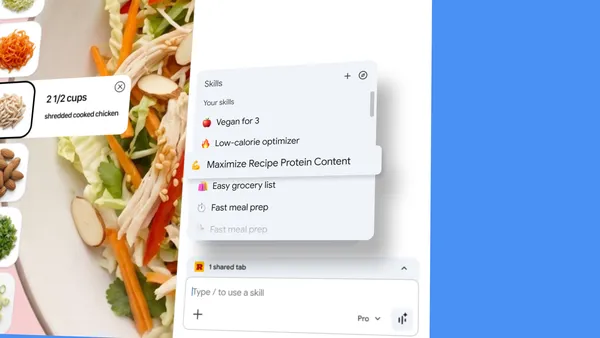
Google just announced Skills for Chrome’s built-in Gemini assistant. The idea is simple: you write a prompt once, save it as a Skill, and then run it on any page with one click. No more copying and pasting the same “give me ingredient substitutions to make this vegan” prompt every time you look at a recipe.
How Skills work
When you’re in Gemini on Chrome and you write a prompt that you know you’ll want again, you can save it directly from the chat history. Next time, just type forward slash (/) or click the plus sign (+), pick your Skill, and it runs on whatever page you’re viewing. You can even select multiple tabs and have it work across them.
Early testers have been using this for all sorts of things:
- Calculating protein macros from any recipe
- Generating side-by-side spec comparisons across shopping tabs
- Scanning long documents for key info
I’ve been using one that summarizes terms of service pages in plain English. It’s not perfect—sometimes it misses nuance—but it saves me a ton of time.
The Skills library
Google also shipped a library of pre-made Skills for common tasks. Things like breaking down product ingredients or picking gifts by cross-referencing budget with interests. You can grab one, try it, and tweak the prompt if it doesn’t quite hit the mark.
This is smart because most people won’t bother creating their own prompts. Having a starter set lowers the barrier. My only gripe is that the library feels a bit thin right now. I’d like to see community submissions or at least more categories.
Privacy and control
Skills inherit Chrome’s existing security protections. They ask for confirmation before doing anything like adding a calendar event or sending an email. Google also mentioned automated red-teaming and auto-updates, which is standard but good to hear.
One thing I appreciate: saved Skills sync across signed-in Chrome desktop devices. So if I save a Skill on my work machine, it’s there on my home desktop too. No mobile support yet, which is a bummer, but I’d expect that to come.
The bigger picture
This isn’t revolutionary tech—it’s just making something that already works more convenient. But convenience is exactly what AI tools need right now. The whole point of AI assistants is to reduce friction, and having to retype prompts defeats that purpose.
Skills are rolling out starting today to Gemini in Chrome on desktop. If you don’t see it yet, check back in a day or two. It’s worth the wait.
Comments (0)
Login Log in to comment.
Be the first to comment!