
Google just announced a significant update to its AI Mode in Chrome, and for once, the hype might actually be warranted. The core idea is simple: stop forcing people to constantly switch between search results and web pages. If you’ve ever been deep in research mode—hopping between tabs, losing your train of thought, forgetting which page had that one stat—you know exactly what they’re targeting.
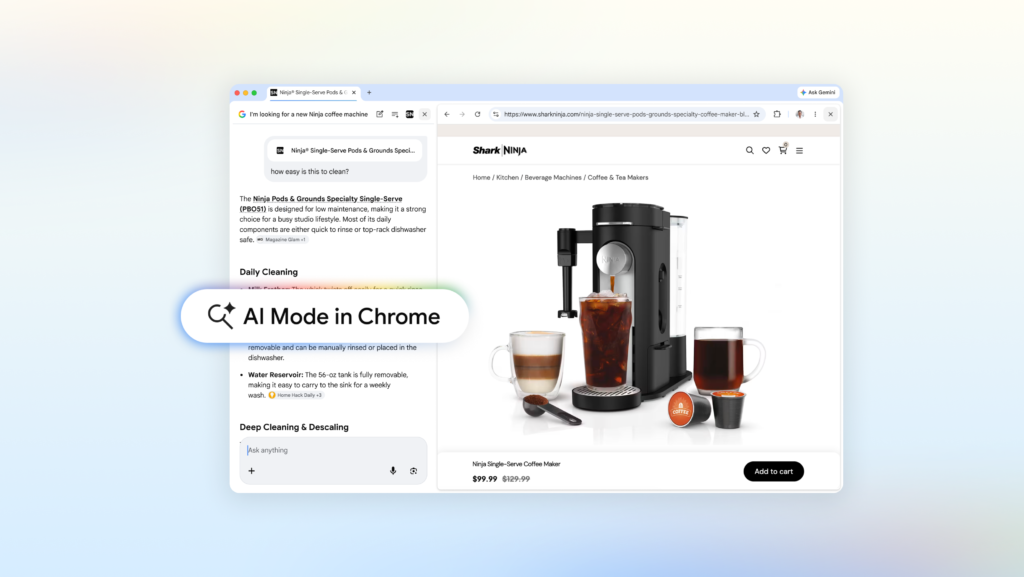
The headline feature is a side-by-side layout. On Chrome desktop, when you’re in AI Mode and click a link, the page opens right next to the search interface. No new tab, no back-and-forth. You keep your search context visible while reading the article or product page. This is higher than I expected from Google’s usual incremental updates.
Let’s say you’re looking for a coffee maker that fits a small apartment and makes lattes. You describe that in AI Mode, get a list of options, click one, and the retailer’s site opens alongside. You can then ask, “How easy is this to clean?” and AI Mode uses both the page content and broader web knowledge to answer. It’s a fluid, natural way to dig deeper without losing your place.
The same applies to more complex research. Want to compare McLaren Racing teams and their pit crew training? Open the official site alongside AI Mode, ask follow-ups, and move to the next page without breaking flow. Early testers reportedly loved not having to switch tabs constantly, and I can see why—this approach has been tried before (looking at you, Bing Chat), but Chrome’s integration feels more native.
Searching Across Your Open Tabs
Google also added a feature I’ve wanted for years: the ability to search across your currently open Chrome tabs. On desktop or mobile, you can tap a new “plus” menu in the search box on the New Tab page (or within AI Mode) to select recent tabs and add them to your query. You can also mix in images or PDFs. This isn’t just a gimmick.
Imagine researching local hiking trails with several sites open. You can add those tabs to your search and ask for similar kid-friendly trails in a different location. Or, if you’re studying for a statistics midterm, bring in open tabs with class notes, lecture slides, and academic papers, then ask for more examples to illustrate a tricky concept. AI Mode uses those tabs as context and suggests additional sites to explore.
This is a genuinely useful capability. The web is full of fragmented information, and being able to query across multiple sources in one go—without manually copying and pasting—saves real time. It’s not perfect; the feature only works with tabs you’ve explicitly selected, not your entire browsing history. But that’s probably a good privacy trade-off.
Canvas, Image Creation, and Other Tools
The post also mentions that powerful tools like Canvas and image creation are accessible from within AI Mode. Canvas lets you draft, edit, and iterate on content directly in the search interface. Image creation, presumably powered by Google’s Imagen model, lets you generate visuals on the fly. These aren’t new in isolation, but integrating them into the search flow makes them more discoverable.
I’m slightly skeptical about how well these features will work in practice. Canvas has been around in various forms (Google Docs, Bard, etc.) and often feels bolted on. But if Google can make it feel like a natural extension of searching rather than a separate app, it could be useful for quick drafting or brainstorming.
The Bigger Picture
Google’s AI Mode in Chrome is part of a broader trend: moving search from a transactional “type query, get links” model to a conversational, context-aware assistant. Microsoft has been pushing this with Copilot in Edge, and Apple is rumored to be working on something similar for Safari. Google’s advantage is its massive user base and deep integration with Chrome, which already dominates the browser market.
The real test will be whether these features actually reduce friction or just add more clutter. The side-by-side layout is promising, but it requires a reasonably large screen to be comfortable. On mobile, the experience might be cramped. And the tab-search feature, while clever, depends on users remembering to select tabs before asking questions—a habit that takes time to form.
Still, I’m cautiously optimistic. This is the first Chrome update in years that feels like it was designed by people who actually use the web for research, not just for checking email and watching YouTube. If Google iterates on this and listens to feedback, AI Mode could become a genuinely indispensable tool for anyone who spends serious time online.
Comments (0)
Login Log in to comment.
Be the first to comment!